Showing posts with label Sony Ericsson. Show all posts

Monday, March 19, 2012

bench3

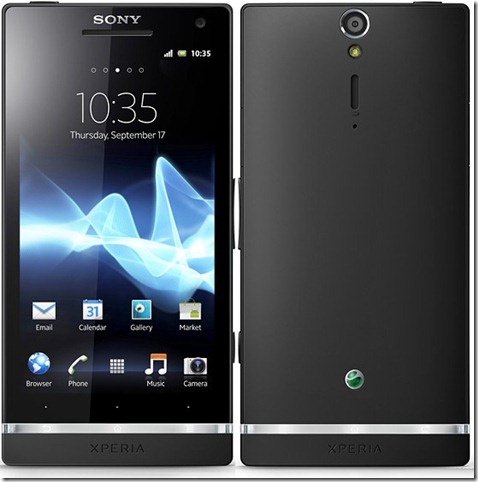
Sony Xperia S Advantages And Disadvantages

The Sony Xperia S aims for camera excellence with 12MP still photography and 1080p video recording. It has an HD screen and a microHDMI port, not to mention a dedicated TV Launcher that lets you control the phone with your TV remote.

The Xperia S is a high-performance phone too - while quad-core phones will soon hit the shelves, the dual-core 1.5GHz processor and Adreno 220 GPU show good results in early benchmarks.

Sony Xperia S Advantages And Disadvantages

The Xperia S is better in almost every respect with Sony Ericsson Xperia arcs, save for thickness. Still, considering how thick those old 12MP shooters were (especially around the camera), 10.6mm sounds great.

The screen on the Xperia S deserves praise too. The 4.3" BRAVIA LCD of 720p resolution is up there with the best screens on the market. At 342ppi, it's definitely one of the sharpest.

The Xperia S design is a combination of square angles and curves. A strip of transparent plastic at the bottom, which lights up when the display is on, is a prominent accent.

The screen on the Sony Xperia S promises great things and it delivers - it's mesmerizingly sharp, with punchy colors and very good contrast. It's backed by BRAVIA engine which does very well on screens with high pixel-density - and the Xperia S display is one of the most pixel-rich at 342ppi. Its only downside (and it's not a minor one) is the poor viewing angles.

Xperia S Battery

The battery is a 1750 mAh unit, which is said to provide about 450 hours of 2G stand-by (420 hours in 3G) or up to 7 hours and 30 minutes of talk time in 2G (8 hours and 30 minutes in 3G).

Xperia S Camera:

Xperia S features the star of the show - the 12MP camera. It's located very near the top edge, which means you'll have to be very careful not to put a finger over it when taking a photo.

The camera is accompanied by a single-LED flash and the secondary microphone used when shooting video. The loudspeaker grille is also here.

3D Sweep Panorama On Xperia S:

The 3D Sweep Panorama is business as usual - you press the shutter key and sweep the phone from left to right and you get a panoramic photo in the end that can be viewed in 2D or 3D (on a compatible TV).

The Sweep Multi Angle was much more impressive - you take a photo in the exact same way, but the result is very different. It produces something like a lenticular card.

The Sony Xperia S captures 1080p video at 30 fps and does a very good job of it. The camcorder has similar settings to the still camera, including focus mode, metering, exposure value, image stabilization and so on. The layout of the shortcuts can be customized here too.

The Xperia S camcorder features continuous autofocus. It may take a few seconds to refocus after you re-frame but that's better than repeating attempts to lock focus that may ruin a video.

Videos are stored in MP4 format (14Mbps bitrate) and the frame rate nails the 30fps mark. The Xperia S videos come with stereo sound recorded at 128Kbps bitrate and 48kHz sampling.

User interface On Xperia S - Android Gingerbread again

The Sony Xperia S has received a slightly revamped custom skin, but it's still Gingerbread underneath (2.3.7). It will be updated to Ice Cream Sandwich, of course, along with others in the Xperia line.

Connectivity On Xperia S:

The Sony Xperia S is well versed in modern connectivity. It doesn't have LTE like the Xperia ion, but it does offer quad-band 2G and quad-band 3G. Mobile data speeds are boosted by 14.4Mbps HSDPA and 5.76Mbps HSUPA.

Local connectivity is covered by Wi-Fi b/g/n with Wi-Fi Direct support, that enables file transfer between devices with an easy setup.

The Xperia S also supports DLNA, so you can easily play media (photos, videos, music) from DLNA-enabled storage devices or push content from your phone to a DLNA TV or music player.

Bluetooth is also onboard, but the boring 2.1 version (although Wi-Fi Direct makes up for the lack of BT v3.0).

Then there's NFC support - you can use it to read NFC tags but also make the phone act as a tag itself. You can create multiple tags and choose which one you want to share. A tag can be anything from contact info (usually yours so you can send it as a sort of wireless business card), a URL or just plain text.

Xperia S has a microHDMI port so you can easily play those FullHD videos and show off the 12MP photos on an HDTV. There's a twist too - there's a dedicated TV launcher that is easy to use on a big screen.

Compatible TVs (we're not sure which TVs are) can talk back to the Sony Xperia S, so you can use the TV's remote to operate the launcher. Typing with the remote isn't very handy, you can use voice search.

The Sony Xperia S has a microUSB port with USB On-The-Go support. Flash storage worked. we even tried a USB keyboard and it worked (but a USB mouse didn't).

One more connectivity feature before we're done - the Xperia S has a built-in A-GPS receiver, which also works with GLONASS. This can give you faster locks and better positional accuracy, especially in dense urban areas.

And Here are the specifications:

  • Dimensions: 128 x 64 x 10.6 mm, 144 g
  • Display: 4.3" 16M-color TFT capacitive touchscreen, 720 x 1280 pixels
  • CPU: Qualcomm MSM8260 chipset, dual-core 1.5 GHz Scorpion CPU, Adreno 220 GPU
  • OS: Android 2.3 (Gingerbread), planned 4.0 Ice Cream Sandwich update
  • Memory: 32GB of storage, 1GB of RAM
  • Camera: 12 megapixel auto-focus camera with LED flash, face detection and touch focus; 1080p video recording at 30fps; 1.3MP front-facing camera with 720p video recording, sweep multi-angle shots for lenticular print effect
  • Connectivity: Wi-Fi b/g/n, Wi-Fi Direct, DLNA; Bluetooth 2.1 with A2DP, standard microUSB port, GPS receiver with A-GPS, 3.5mm audio jack, microHDMI port
  • Misc: Sony Timescape UI, TV launcher, built-in accelerometer, proximity sensor, Sony Mobile Bravia engine, multi-touch input, scratch-resistant surface, microSIM only

Final Note:

The Sony Xperia S is worlds ahead of the previous Xperia generation and we're genuinely impressed. The Xperia S hasn't got a quad-core processor (not even a next-gen dual-core) and it only comes with Android 2.3 Gingerbread out of the box for now.

But here's what the Xperia S has going for it: the screen is nothing short of amazing, the camera is one of very few to offer 12MP resolution and the connectivity has plenty of useful features. And Sony really managed to squeeze every ounce of performance out of the Snapdragon chipset inside. We do like the new design line too.

The phone looks great and the build quality is worthy. If you can get over the lack of two extra cores and ICS at launch (the update is coming), there's plenty to like about the Sony Xperia S.

Read More

Friday, December 9, 2011

bench3

LG Optimus Way Ahead Of Other Mobile Brands

The LG Optimus 2X is the world's first Tegra-2 phone which is a dual-core processor that will run Android 2.2 (and 2.3 upon upgrade) at lightning speeds.

First Dual-Core Phone Available To The Public: LG Optimus 2X indeed is the world’s first dual-core smartphone (both announced and released). This achievement was acknowledged by the Guinness World Records.

The phone was rushed a bit and was released with Android 2.2 instead of later with Android 2.3. When compared to the other dual code phones, the Optimus 2X started looking somewhat unfinished and incomplete. Various bugs, and excessive battery drainage and the lack of Android 2.3 Gingerbread are somewhat of deal breakers.

LG Optimus Way Ahead Of Other Mobile Brands

More power to LG for this, but I think back when Samsung came out with the Omnia HD being the first phone capable of HD recording and playback it was a much bigger stand point in the mobile world.

My question on Optimus 2x as a gaming phone got completely overshadowed as a result.

Symbian (at its current state atleast) wont be able to fully utilize 1ghz CPUs. It is meant to be slow yet resource efficient. It's just living undead.

Nokia lost momentum when the touchscreen revolution began. They invest way more on research and development and it still takes them 2 years to make a good touch based web browser.

2x is more powerful for a gamer who'd also do other stuff with it and seems easier to handle.

Nokia is much popular but technically they lack behind. Popularity is one thing, technical advancement is another. For the average geek like me, the latter holds more importance. Nokia is struggling to catch up on the Smart Phone market. Right now, Nokia is replacing their previous board members with newer ones. Also, they are focusing on cheaper S^3 phones as well as WP7 phones. They are struggling polishing MeeGO OS as they are only planning on releasing 1 MeeGO model this year.

Fact File: The 5800 XpressMusic was released on April 27, 2008 and it sold over 8 million units by November 2009. It took Nokia 19 months to sell that much while the Samsung Galaxy S I9000 was released in June 2010 and sold 10 million units by January 2011 and Apple sold 18 million iPhones last quarter alone. That's 18 million iPhones in just 3 months.

Nokia N8 Suffers From Purple Screen Defect:

Nokia may be popular but that's because people living in populous nations thinks Nokia is still the best. Nokia has gone down the hill and Nokia can't even get the purple screen defect fixed. That's how bad Nokia has come down when it comes to quality. Almost all Nokia N8 is affected by this defect. They admitted the defect on the N8 but they don't have a fix for it. Check it out. It's pathetic.

Its also bad to underestimate NOKIA. Because when all leading brand have touch screen phone in their bag then Nokia is the last one to introduce touch screen phones and when it launch touch phones it is loved and successful to some extend. And when Samsung(Pixon 12) and Sony Erikssonz (satio) have 12mp Xenon flash camera phones in their bag then again Nokia is the last one to introduce 12 MP camera phone with lots of new features in Nokia N8.

Also For example, Sony Ericsson is very poor on battery when compared to Nokia. what’s d essence of having a phone wit no good charge span. I hope Sony Ericsson will improve on that because that’s what suffering from my w810i, with 3 batteries, it still doesn’t last 24hrs. Read more: http://www.bench3.com/2011/05/sony-ericsson-xperia-x10-mini-pro.html

Read More

Thursday, November 24, 2011

bench3

Sony Ericsson Xperia Pro Advantages And Disadvantages

Sony Ericsson Xperia Pro is business smartphone with optimized slider QWERTY keyboard and latest Android v2.3 Gingerbread OS preloaded with Office Suite Pro for editing office documents and advance functions like syncing your email, calendar, contacts in a safe & secure way at a premium price.

The Sony Ericsson Xperia Pro adds a physical QWERTY keyboard to the best Sony Ericsson have to offer today. That includes a LED-backlit Reality display with Sony Mobile BRAVIA Engine, an 8 megapixel ExmorR camera sensor, 720p video with continuous autofocus, and the latest Android 2.3.4.

And finally, you will get a couple of user guides and an 8GB microSD card in the Sony Ericsson Xperia Pro box. The only thing missing is an HDMI cable. But usually is a market dependent feature.

The Xperia pro runs the latest version of Android and has a FWVGA screen, giving you access to the whole Android Market. The MSM8255 chipset should be able to handle most apps in there too.

And just as how we see on Apple’s Store, the Android Market had another visual boost lately plus a layout redesign. Now you get a few scrollable tabs - categories, featured, top paid, top free, top grossing, top new paid, top new free and trending.

The Xperia pro for is a smart messenger that might appeal to both business customers and young social users. If you don't need a huge gadget in your pocket, you will actually find the Xperia pro relevant to what you need even without multiple-core processing or FullHD video. In short, the bigger screen and keyboard should make enough of a difference.

The all-plastic Sony Ericsson Xperia pro weighs in at 142 grams and stretches to 120 x 57 x 13.5 mm. That's nearly the same size as the Xperia neo, which is quite an achievement, considering they squeezed in a QWERTY keyboard without increasing the thickness. It's a reasonably compact messenger with good handling, and it looks even slimmer because of the inward rear curve.

Sony Ericsson Xperia Pro Advantages And Disadvantages

The Xperia pro finish is heavy on gloss and gets covered in grease in no time. The smudges are quite hard to clean too but, luckily, not as visible on the red and probably silver version. For the black one though there is no hope.

Most of the phone’s front is taken by the 3.7" 16M-color LCD screen with a resolution of 854 x 480 pixels. The questionable feature is viewing angles: when you look at the display at an angle, contrast is quickly lost and the colors get washed out.

As to the keyboard itself, it uses the exact same layout as the Mini pro but the well-spaced keys enjoy more room and that's all to the user's benefit. The keys are prominent enough with nice matte finish, the press feedback is good. This is one of the most beautifully lit keyboards. Each key is outlined by a thin thread of light and the symbols are nicely illuminated.

The Xperia pro is powered by a 1500mAh battery, which should be enough to last three days of normal usage. That’s better than what we are used to seeing from modern-day smartphones.

The phone is well built, though we have our gripes. There is a wobble in the slider - the bottom of the phone is looser than the top. It's not too worrisome but it's there. The back cover is a hassle to open but let's say you won't need to do that too often. The Power button and the shutter key could've been better. We don't mind the plastic build and the sober styling. The phone looks good and handles well without being a design wonder. Because of the fingerprint issues we wouldn't recommend the black version.

Here is a video of the user interface in action, which is a good starting point.

video of the user interface in action, which is a good starting point

The Xperia pro has some custom-made Sony Ericsson widgets in addition to the standard set. Those include the Timescape widget (there's a dedicated app too) and a Mediascape-like widget for photos and videos. The actual app isn't there anymore, the standard gallery is back.

Creating folders is simple, using the iOS logic (and visual layout). You drag one icon over another and a pop-up prompts you to select an icon and a name for the folder you’re about to set up.

The lockscreen is standard Xperia fare. Which means you get notifications for Facebook events too. The standard notification area and task switcher are of course present and accounted for.

Screenshot:

There is one more thing worth mentioning - the Take Screenshot shortcut. It's found in the power settings and you need to press and hold on the Power/Lock key to access it. It would have been better if Sony Ericsson has made it with a combination of two keys (like the iOS's Home+Lock combo) rather than a virtual shortcut, but at least it's there.

TimeScape:

The Timescape brings all your communications together: an aggregate view of your SMS, MMS, email, call log, Facebook and Twitter updates. Timescape has a tabbed structure, allowing you to filter the contents by type and get all relevant information in one place.

With Timescape you not only see the latest activities and updates of your contacts but also share your own status, reply to received messages or return a missed call.

The best part of the new Timescape is that you can set it as a homescreen widget. It will show all of your updates as tiles. You no longer need to sacrifice all your homescreen real estate.

If all these functions are not enough, there are free Timescape plugins on the Android Market for Sony Ericsson users. There are already plugins for mixi, Foursquare, Orkut, Gmail, Music, Photo, etc. extensions.

Sync With Multiple Accounts:

You can sync with multiple accounts, including Exchange and Facebook, and you can selectively show or hide contacts from some accounts, or set the phonebook to display only contacts with phone numbers.

And if a contact has accounts in multiple services, you can “join” their contact info to keep everything in one place. Their Facebook photos and interests (part of the Facebook integration) will show as extra tabs.

Unfortunately, the Xperia pro as every other Xperia phone does not support smart dialing. There’s voice dialing though (the quickest way to activate it is the dedicated homescreen widget).

Proximity Sensor: Thanks to the proximity sensor, the Sony Ericsson Xperia pro automatically disables the touchscreen when you hold it next to your ear during a call.

No Unified Inbox

Moving on to email, the Gmail app supports batch operations, which allow multiple emails to be archived, labeled or deleted. The app supports multiple Gmail accounts, but there’s no unified inbox for other email services.

The generic email app can do that however. It can handle multiple POP or IMAP inboxes and you have access to the messages in the original folders that are created online.

Google Talk handles the Instant Messaging department. The GTalk network is compatible with a variety of popular clients like Pidgin, Kopete, iChat and Ovi Contacts.

Large, Easy To Press Buttons:

As for text input, the Xperia pro offers a just the default (Gingerbread) on-screen full QWERTY keyboard. Even on the portrait keyboard, typing is pretty comfortable, keys are large enough and well spaced.

Flipping the phone to landscape however tells a whole new story. The large on-screen keyboard takes more than half the screen and gives you large, easy to press buttons. The Xperia pro is probably as good as you will ever need – in virtual keyboard terms of course.

QWERTY keyboard:

But who actually cares about those virtual keyboards, when you have the real deal - a full four-row QWERTY keyboard at your disposal. After all this should be the sole reason the buy the Xperia pro. And guess what? The keyboard turned out to be excellent. It's the fastest and easiest way to do all the typing and you will be pleased for sure.

Sony Ericsson has added support for Facebook albums too. They are distinguished by the small Facebook logo on them and when viewing individual pics from that album, you can "like" them with the thumbs up button in the upper right corner.

The BRAVIA engine:

The BRAVIA engine enhances contrast and colors, as it sharpens the image and reduces noise. These steps would normally lead to artifacts, but the high-density screen of the Xperia ray makes them invisible. You can switch BRAVIA off, but we recommend you keep it on - it really improves the image quality. As the native video player is a disappointment.

Well, that’s another disappointment – the video player supports only 3GP and MP4 videos.

To its credit, the Xperia pro did play a 720p MP4 video (but not 1080p). And the 3.7” FWVGA Reality screen offers excellent image quality (the BRAVIA engine comes into play here too) and spot-on aspect ratio.

The music player on the Xperia pro is the same app you get in the Xperia ray, the Xperia arc S. The interface is laid out in four tabs for the available sorting options: all artists, all tracks, playlists and albums. If you hit the menu key you’ll get a search shortcut, as well as send and delete options.

The music fans will appreciate the rich selection of equalizer presets. You also get Silent mode, which mutes all other sounds except for alarms - great for uninterrupted listening.

The Sony Ericsson Xperia pro is also equipped with an FM radio, which has a really neat and simple interface. It automatically scans the area for the available stations and places “notches” on the frequency dial for easier scrolling to the next station. Or you can mark some of them as favorite.

8 megapixel camera offers Sweep Panorama

The Xperia pro boasts an 8 megapixel camera, complete with a single LED light. Much like the Xperia ray, arc and arc S, the Xperia pro uses an backlit Exmor R sensor, which promises improved low-light performance. Our experience with these sort of sensors is that they indeed offer lowered noise levels but the improvement is nothing that major.

The camera controls on the Xperia pro are available on two taskbars on either side of the viewfinder. The left one holds five shortcuts to various settings, while the right one shows thumbnails of the five most recent photos.

You can choose between five capture modes - Normal, Scene recognition, Smile detection, Sweep Panorama and 3D Sweep Panorama. In Normal, you pick the Scene settings manually or you can enable Scene recognition and let the Xperia Pro take a guess (it's fairly good at it).

The two panorama modes are the additions brought by the Android 2.3.4. The Sweep Panorama option is available in lots of Sony portable cameras, so it should be familiar to some of you. Anyway, it’s very easy to take a panorama - you just follow an on-screen slider until you reach the end and your panorama shot is taken.

Unfortunately you can't choose how long it will be, you have to shoot it until the slider run out. If you are too slow or too fast you'll have to start over.

Depending on which panorama mode you have chosen, you will be able either to view your 2D shot (4912x1080 pixels) on your Xperia pro or take it on a 3D TV and see it there.

The panorama shots are captured with 4912x1080 pixels resolution and if you take them with a tripod they will be assembled perfectly. If not, you'll be surprised to out the pictures are almost as good as tripod enhanced ones.

The Sony Ericsson Xperia pro captures 720p video at 30 fps and does a very good job of it. The camcorder has similar settings to the still camera - focus mode, metering, exposure value and image stabilization are all user-configurable.

Videos are stored in MP4 format (6Mbps bitrate) and the frame rate nails the 30fps mark. The amount of captured detail is very good and so are the colors (though they're oversaturated again). Contrast is good too.

The amount of detail drops a bit in the dark as noise reduction fights to keep videos mostly noise free.

Connectivity Options:

The Sony Ericsson Xperia pro has a good deal of connectivity options. The basics are covered by quad-band GSM/GPRS/EDGE and tri-band HSPA with download rates of up to 7.2 Mbps and upload at 5.76 Mbps.

It offers Wi-Fi (b/g/n) and Bluetooth 2.1 for wireless local connectivity. The Connected devices app turns your Xperia pro into a DLNA server, letting you view media on DLNA-enabled devices (e.g. TV, PlayStation 3).

The microUSB v2.0 port handles both wired data transfer and charging. With the Android 2.3.4 Xperia pro supports USB on-the-go, but you have to buy the Sony Ericsson Live Dock to be able to use it. When you get the accessory, you can connect USB Flash drives, keyboard and mouse to your phone.

A standard 3.5mm audio jack and a micro HDMI port complete the connectivity tally. There is no micro HDMI cable included in the retail box, but usually is a market dependent feature.

Storage:

The inbuilt storage has 240MB only available to the user, but you can expand it up to 32GB via the microSD card slot. The phone ships with an 8GB memory card.

Web browser:

The user interface of the browser is simple, with almost no visible chrome by default. Once the page loads, all you see is the URL bar and the bookmark button at the top of the screen. Once you zoom in and pan around though even that disappears (scroll to the top or press menu to bring it back).

One of the important features in the web browser is the full Flash 11 support. YouTube videos played smoothly at 360p, 480p and even 720p - no dropped frames and audio lag. It seems the new Flash 11 is much optimized than it’s the 10.x versions. Flash games played trouble free too.

Office Suite:

The Sony Ericsson Xperia pro comes with a solid set of organizing options, including a document viewer.

OfficeSuite supports both viewing (Word, Excel, PowerPoint and PDF, including the Office 2007 versions) and editing/creating (Word, Excel and PowerPoint) document files.

Reading documents is quite comfortable on the high-resolution screen and panning is blazing fast.

The doc viewer integrates with both Gmail and the generic email app, which makes viewing attachments a cinch. The generic Email app even lets you download the attachments.

Integrated Calendar:

The calendar has three different types of view - daily, weekly and monthly. The lower section of the screen is reserved for Agenda: a list of upcoming events.

The Calendar also pulls info on upcoming events from your Facebook account. Events appear just like regular events but you can't edit them from the phone, they are read-only.

The alarm clock app allows a huge number of alarms to be set, each with its own start and repeat time. The Alarms app can also work as a desk clock - you have a big toggle for the brightness, weather info and shortcuts to gallery slideshow and the music player.

Unfortunately, you don’t have the Stopwatch, Timer or World Clock options. You don’t get a Voice Recorder either. There's plenty of those in the Android Market though.

GPS And Maps:

The Sony Ericsson Xperia pro comes with a GPS receiver, which took less than 3 minutes to get satellite lock from a cold start. You can use the A-GPS functionality to get near instantaneous locks or the network positioning if you only need a rough idea of your location.

Offline Maps rerouting is one – if you stray off course, Maps will recalculate the route without the need for an Internet connection. You can’t change the destination without a connection though. There are also 3D buildings, two finger rotation, tilting and so on. Of course, those features aren’t available everywhere. 3D buildings are available mostly in the biggest world cities.

Turn-by-turn voice guidance using Google Maps Navigation is only available in select countries and unless you live in one of them the best you can do is plan a route in advance and keep an eye on your current location during travel.

Street view is, as usual, a part of the standard package - it gives you a panoramic view of every bit of road in the covered areas. With the compass mode enabled, it feels like a virtual tour of the place!

Key features And Advantages Of Sony Ericsson Xperia Pro

  • Four-row slide-out QWERTY keyboard
  • 3.7" 16M-color capacitive LED-backlit LCD touchscreen of FWVGA resolution (480 x 854 pixels) with Sony Mobile BRAVIA engine
  • Android OS v2.3.4 Gingerbread
  • 1 GHz Scorpion CPU, Adreno 205 GPU, Qualcomm Snapdragon MSM8255 chipset, 512 MB RAM
  • 8 MP autofocus camera with LED flash and geotagging
  • 720p video recording @ 30fps with continuous autofocus and stereo sound
  • Accelerometer and proximity sensor
  • microUSB port (charging) and stereo Bluetooth v2.1
  • Voice dialing
  • Adobe Flash 11 support
  • microHDMI port

Some of the Main Disadvantages Of Sony Ericsson Xperia Pro Are as listed:

  • Display has poor viewing angles
  • No smart dialing
  • No Stopwatch Timer or World Clock Options
  • microSD card slot is not hot-swappable
  • Battery cover is a hassle to open
  • Slider a bit wobbly
  • Black case extremely prone to fingerprints. Yes, because of the fingerprint issues we wouldn't recommend the black version.
  • Video player supports only 3GP and MP4 videos
  • To view the 3D panoramas, you need to connect your phone to a compatible 3DTV.

End Note:

Sony Ericsson Xperia Pro is the kind of phone that can enjoy demand from both business users and social networking fans. And is now ready to offer the Android experience to users of all backgrounds and ages. It was recently confirmed too that all the company’s recent smartphones would get the Ice-cream Sandwich update.

The screen size and resolution are more than adequate, the QWERTY keyboard is great. There’s a solid office and organizer package right out of the box – and the Android Market is the limit. The social and imaging skills are not just a bonus, they add an extra dimension. Even without dual core under the hood, the Xperia pro is by no means underpowered. And it can squeeze more life of the 1500mAh battery.

If you don't need a huge gadget in your pocket, you will actually find the Xperia pro relevant to what you need even without multiple-core processing or FullHD video. In short, the bigger screen and keyboard should make enough of a difference.
Read More

Saturday, July 9, 2011

bench3

Sony Ericsson Xperia Arc Advantages And Dis Advantages

Here is Sony Ericsson’s next Android smartphone, the Xperia Arc. Packing the latest version of Android in a sleek, curvy body with a quality 8 megapixel camera and a 4.2-inch Reality Display, the Xperia Arc was a fine all-round device. And it is about $ 600 in US.

Sony Ericsson  has launched the device stateside in a SIM-free version. The unlocked Xperia Arc will set you back by $600, which is fair considering the specs of the device.

Most of  us will like the design and the software of the Sony Ericsson Xperia Arc better than any of the previous version of Sony Ericsson mobiles. As for the screen, Arc has better outside visibility.

If you want to compare Sony Ericsson Xperia Arc with Samsung Galaxy II or the iPhone,

I can say that Sony Ericsson Xperia Arc Looks great. It has a great shape and Samsung having more advantage on speed, huge screen, better display as it has bigger screen and comes with full HD 1080p video recorder. Shape wise, Arc wins. Battery wise, iphone4 wins.

One should never forget that Samsung Galaxy S II runs on Dual-core 1.2GHz ARM. Where as Sony Ericsson Xperia Arc runs on 1.GHz Scorpion processor. The performance depends on the CPU. And again, the CPU depends on what you pay for it. Dual core means, it consumes dual the power of your battery. And that is one reason we can say that Sony Ericsson Xperia Arc consumes less power than other smart phones running on Dual Core.

But, no one really needs a dual core smartphone when a single core is enough. Sony always had better sound than any other mobile. The arc as a good battery performance for its range, the camera is on of the best and the first to have retro-illuminated sensor.

Sony Ericsson Xperia Arc has the best screens with great looking colors' and nice resolution and not useless stuff as high contrast or high viewing angles.

There is already an update available for Sony Ericsson Xperia Arc from 2.3.2 to 2.3.3 And when you upgrade you will get the following benefits or changes from the previous version.

  • You can know how many unread messages you have even before unlocking the phone. That is, when you press the power button on top to turn on the screen and before swiping the screen to unlock.
  • A new icon appears called Media Discovery that shows all the YouTube videos in your Facebook account.
  • You will get a new icon named Store. I am not really sure if this was in the previous version or how it was named earlier.
  • SIM Toolkit is now available in the Menu
  • Facebook integrated.
  • TimeScape application and the TimeScape widget were a bit slower on the 2.3.2 but on 2.3.3 it will be bit faster

So, we can say that Sony Ericsson Xperia Arc has the Facebook integration, continuous autofocus during video rec, optimized software, and lots of other customizations.

Sony Ericsson Xperia Arc Advantages And Dis Advantages

Screen is also great. AND, AMOLED consumes less power when displaying black colors, while it consumes much more than LCD when displaying white. So in everyday use LCD is still more energy efficient.

It will last around for 8 hours for the first time, with every charge it will increase, it takes around 4-5 charges for a new battery! Lithium battery needs its first charges to get done more often, and to keep you battery last longer, never let it go flat! So, Sony Ericsson Xperia Arc stays for two three days of normal usage.

More over, it runs very smooth and responsive, will never crash as most of the other Smart Phones. As always, Sony Ericsson Xperia has the Good sound quality with headphones and loudspeaker compare to other smartphones!

  • Loudspeaker not the loudest but for a good reason, you will never blow it on full volume!
  • Amazing sleek design, fits perfectly in your palm.
  • Amazing camera despite it is a phone!
  • HDMI is outstanding,
  • Great games and apps,
  • On the market Sony Ericsson have a section suggesting apps which are good and/or only available on Sony Ericsson.
  • Good texting and typing and good quality of calling, some extra features which are good such as when sending a text message it will give you a display that the message has been delivered.

Ok, if we want to talk about the negative side of Sony Ericsson Xperia Arc:

  • No secondary cam, which means no Video call or video Skype calls. If you don’t care for video calls or face to face chat, then this dis advantage wont bother you much.
  • No hot swap memory card, No hot swap SIM card= it's useful to always swap the memory card and SIM card.
  • No USB on the go.
  • No free GPS maps
  • No Bluetooth 3.
  • No FM transmitter
  • No music equalizer. We can ownload one from the market.
  • No USB 2.1. Actually. There is not big diff between 2.0 and 2.1.
  • Very small internal memory. That means, we need to store or move most of the applications to the SD Card.
  • No wide angle camera lens. This is not a Digital camera to have this.
  • No large camera sensor. If we need this, we need to get a professional Sony camera and a zoom lens.
  • No gorilla glass screen. But, most users don’t know what it is.

However, its little too heavy for the specifications, but if price does not matter for you, you can go for Sony Ericsson Xperia Arc as it looks better and more mature. Most importantly, check where your phone is made, because there were few complaints that the phone is Made in China, Designed in China and then a High Premium price.

Overall, this is a happy go mobile from Sony Ericsson. It has got fair battery life with a great external look. Sony Ericsson Xperia Arc will be worth for your money.

Read More

Friday, July 8, 2011

bench3

Sony Ericsson Xperia W8 Advantages And Disadvantages

Sony Ericsson Xperia W8 Walkman is the first phone from the Walkman series to run Android. The handset carries the design accents of an XPERIA X8 save for the addition of fresh colors, but under the hood there is a modest 600MHz processor which powers the almost ancient Android 2.1 garnished with Timescape. The W8 has a 3" capacitive touchscreen, 3.2MP camera, Wi-Fi, AGPS, FM radio and Bluetooth.

Sony Ericsson Xperia W8 is a new Walkman phone to replace Sony Ericsson Xperia X8. Its sound effect will be better, comes with 2GB memory card for you to store music and videos. Note that, applications can only be stored on phone memory and not the external or Memory Card.

The best thing Sony Ericsson Xperia W8 comes with is a pair of mini stereo speakers which is not battery operated and can use as a speaker where u can hear the other party through the speakers and there is a play button for u to press on the speakers. Colors are bright and stylish ones like shining pink, blue,red and orange.

The major difference between Sony Ericsson Xperia W8 and Sony Ericsson Xperia X8 is that W8 has Walkman music player. And will cost around $240 whereas Xperia will cost $189.

Its also disappointing that Sony Ericsson Xperia W8 has no autofocus (with 5Mpx as luxury version!) and no flash support too. It would be interesting to put a play button as the Sony Ericsson W810 or W980 which is the soul of Walkman's. we are not as far of those success stories.

Sony Ericsson Xperia W8  Advantages And Disadvantages

There were problem on Sony Ericsson Xperia W8 in viewing pictures based on different folders. And here is a trick on how to create folder in albums(gallery)

  • You can create folders to sort your picture collections but it will be useless if in album application. Since Sony Ericsson Xperia W8 will always always show all the picture files stored in the memory card no matter in which folder you saved them.
  • Install QuickPic Application from Market, this application allows you to sort the pictures by folder and you can also create new folders using this app.

Can you imagine a Walkman phone without equalizer. Yes its Sony Ericsson Xperia W8. There is no  preset or manual equalizer, and of course the so much loved mega bass is not present. But remember, Sony Ericsson Xperia W8 has got good headsets that you wont feel absence of mega bass.

Sony Ericsson Xperia W8 User Interface

Hardcore Walkman fans are stunned off by the Walkman handsets of today. Perhaps the older Walkman phones provided that genuine Walkman experience. However the phones of today lag behind in most other areas besides the music.

Sony Ericsson Xperia W8 should have promised an upgrade at least up to android 2.2 which Sony Ericsson Xperia W8 doesn’t. And the battery is a major concern if u use internet or games. SE phones are always stylish and Walkman phones are the perfect answer to those who love music.

Sony Ericsson Xperia W8 is still an Android smartphone. Meaning is:

  • Awesome music and adding into this
  • Music application from Market like PowerAmp or MixZing can get us a great music player with equalizers, full bass and pre amplifier (and buy hi-fi stereo headsets with bass enhancement, 115 dB SPL or more)
  • Video performance is good with popular player like Mobo or Real player from Market
  • Internet is fine with Android web browser on Sony Ericsson Xperia W8
  • Camera is just average.
  • Battery performance on Sony Ericsson Xperia W8 is ok when you know how to safe your battery life.

Sony Ericsson Xperia W8 has nothing different from Sony Ericsson Xperia X8 except for the free stereo speaker and the theme. this phone also has a better quality of loudspeaker, which has more sharp and clear sound compare to Sony Ericsson Xperia X8.

Both actually have the same media player - music player and video player are separate applications, no multi media menu. The only different is there's a Walkman logo on W8's player. I only wish w8 provides equalizer feature, which x8 doesn't, as you can find it on Yendo, where Sony Ericsson put eq. settings in sound settings menu.

The other specs are remain the same. but lets just hope Sony Ericsson will give a better firmware for Sony Ericsson Xperia W8 so it will perform better than its sibling, mainly for battery life improvement.

About the price, Sony Ericsson Xperia X8 is getting cheaper recently, and so it is expected that Sony Ericsson Xperia W8 would be released at a reasonable price tag.

But if Sony Ericsson continues to bring such outdated phones to the market, for sure it will disappoint a million Walkman lovers. However one should admit that the sound is still crisp but not so good at camera.  It is understood that Sony Ericsson Xperia W8 is a Walkman and not a digital camera.

Also Read:

Read More

Sunday, May 8, 2011

bench3

Using Sony Ericsson XPERIA X10 Mini Pro As A MODEM

Slider qwerty keypad. This is a fancy little phone and the battery is kind of disappointing, no zoom in camera. Its a good phone to download/read eBooks, read magazines, listen to songs, viewing websites, videos and all that. If you are not looking for big phones, and if size doesn't matter, there is only one word for this phone “awesome”.

It looks easy to use. Xperia is continuing to progress not only by its functions but also with its reduced size. The camera offers enough pixels and the resolution on the screen looks magically good where you can probably find good quality on the mp4 movies/clips.

Read our review of Sony Ericsson XPERIA X10 mini pro at : http://www.bench3.com/2011/05/sony-ericsson-xperia-x10-mini-pro.html

Sony Ericsson XPERIA X10 mini pro work as a MODEM:

It is possible to make Sony Ericsson XPERIA X10 mini pro work as a MODEM. And to do so, just follow the steps below:

  • 1.Download PDAnet from the marketplace
  • 2.Install the PDAnet server for your OS of choice here
  • 3.You will have to restart your computer
  • 4. Hook up your phone, run PDAnet and follow the instructions!

On Mac you have to turn on wifi to get the computer to connect properly. For most people, you should just be able to turn wifi on and not have to connect to anything.  There you go. Now, you are finally able to really use that unlimited 3G data plan on your computer.

A great feature of PDAnet is that all traffic is actually rooted through your phone so your carrier can’t tell that you are tethering. As far as they know, you are just surfing the web on your phone.

Read More