Showing posts with label Media. Show all posts

Wednesday, April 11, 2012

bench3

Facebook Acquires Instagram For $1Billion

Instagram, the popular photo sharing application which gained prominence on iOS – is recently made available for Android. Complete with a beautiful user interface and a full feature-set, it seems to have been worth the nail biting.

And even more recently, Facebook announced an agreement to acquire Instagram for roughly $1 Billion in cash and shares in the social network. Facebook said it expects to close the transaction later in the second quarter of 2012.

Co-Founder and Chief Executive Officer Mark Zuckerberg said in a status update that the two companies will remain independent, and that Instagram users will still have the ability to post to multiple social networks.

There was speculation last year that Facebook was planning to roll out a series of photo filters, in part to compete with apps like Instagram. By acquiring Instagram, Facebook now has the best of both worlds.

Ok, here is the status update from the Co-Founder and Chief Executive Officer of Facebook Mark Zuckerberg:

I’m excited to share the news that we’ve agreed to acquire Instagram and that their talented team will be joining Facebook.

The social network has continued to improve its photo viewer, and adding support from the Instagram team will likely lead to further refinements.

Millions of people around the world love the Instagram app and the brand associated with it, and Facebook should try to help spread this app and brand to even more people.

Providing the best photo-sharing experience is one reason why so many people love Facebook, and we knew it would be worth bringing these two companies together.

From our point, we do expect lots of changes from Facebook to its photo-sharing process… What could it be? Share your thoughts on comments!

Read More

Friday, April 6, 2012

bench3

Advantages Of Instagram for Android

Instagram, the popular photo sharing application which gained prominence on iOS – is now available for Android. Complete with a beautiful user interface and a full feature-set, it seems to have been worth the nail biting.

On the 3rd of April 2012, Instagram finally became available to users of the Google operating system. This is probably the most anticipated application to grace Android devices to date.

The popular photo sharing application has been around from 2010 but all this while has been limited to only users of iOS devices.

All the filters found on iOS are found on Andriod Version Too: The Android app offers an extremely familiar Instagram experience when compared to the iOS app. You’ll find all the same exact filters and community as on Instagram iOS version.
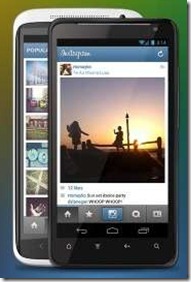
Advantages Of Instagram for Android

The first version of the app for Android shares most of the features found on the iOS version except for Tilt Shift / Blur, Share from Feed, Live Preview and Share to Flickr.

However, succeeding versions of the app will bridge this gap between the two operating systems.

To download the much awaited app on your Android device, head on to the link here or through the Google Play app on your handset, install it and become a part of one of the biggest photo sharing applications to date.

So what makes this app so successful?

The basic premise of the app is quite simple: take a photo, choose a filter and upload it to Instagram. There's also the option of posting to Facebook, Twitter, Flickr, Tumblr, etc.

Advantages Of Instagram for Android 2

Filters Make Instagram Popular:

What initially made the app so popular was how good the filters are. For example: the ability to transform an otherwise dull photograph into a romantic, sepia-tinted print. The other reason: quick access to social networks.

Apart from sharing on regular social networks, Instagram itself has become a worldwide photo sharing community, allowing people to browse other users' uploads and comment on them. The fact that Apple has been upping the ante on its devices' cameras has also contributed greatly to Instagram's success. Better cameras mean better photos.

Instagram's solitary association with Apple almost made it a sort of a status symbol. Now that the app is on Android, it's going to be accessible across a variety of devices and across different grades of cameras. Some better than the Apple's offerings, and many worse.

As of now, the app is available on Android phones running version 2.2 and above. There is no support for Android tablets yet. But with more than 4.3 lakh users on the wait list for the Android app, it looks like Instagram's success story is only beginning.

Features of Instagram:

  • 100% free custom designed filters and borders
  • Lux works its magic by making your photos more vibrant and brings out details in your photos you couldn’t see before
  • Instant sharing to Facebook, Twitter, Tumblr, and Foursquare (Flickr coming very soon)
  • Interact with friends through giving & receiving likes and comments
  • Works with Android versions 2.2 and above that support OpenGL ES 2
  • Full front & back camera support
  • And much much more…

Some people are scratching their heads wondering “what’s the point of this app?” But I think it’s best to just download it and see for yourself. It made a lot of sense on iOS considering the OS’s sharing system is gimped compared to Android’s, but Instagram’s collection of filters and their beautiful photo stream, not to mention automatic uploading to tons of social networks, should be worth the download.

Get the free app, which has sustained a full five star rating in the Google Play Store.

Read More

Friday, March 30, 2012

bench3

Free Software to Convert MTS to MPEG4

If you are looking to convert mts files to mpeg4 so that it can be convenience for every one to edit them.

Ofcourse, there were so many paid softwares for doing this job. But, what is more interesting is that we can achieve that without paying a single penny. Yes, at free of cost, using a free software.

MTS to MP4 Converter:

The MTS to MP4 Converter provides the best solution to convert MTS to MP4 with perfect quality and fast conversion speed.

From the below website you can download it for free and get more information.

http://www.mtsconverterreviews.com/mts-to-mp4.html

Read More

Monday, March 26, 2012

bench3

How To Create Animation Effects On iPhone | Flixel App

Flixel is an app for iOS which lets you do animations and then to share with your friends using iOS devices.

This iPhone app won’t make you snap a lot of photos and then stitch them together in a complex manner to make an animation. All you have to do is to point your iPhone or iPad’s camera in the direction of a moving object, and you will have a fully functional animation, which can be edited and then shared with all your friends and personal network on the app.

How To Create Animation Effects On iPhone  Flixel App 1 How To Create Animation Effects On iPhone  Flixel App 2

Flixel starts off with a display of the app’s feed, showcasing all the best shares made by other app users. The Featured images include animations which have received the most likes and favorites from other users.

You can view the animation by tapping its thumbnail, and in its menu, there are options to share it over Twitter, Facebook, Tumblr or via email. Most animations take some time to load up fully, so give it a few moments to enjoy completely.

Although it is possible to use Flixel without signing up for a new account, guests users can’t share their own animations over the app’s own network.

Creating animations using Flixel is easy. Just tap the central camera button in the bottom bar of the app, and you will be taken to the preview screen. The camera sported by Flixel is pretty simple, with just grid and flash buttons present.

After you have captured the animation, you can edit it with ease. There are many filters present in Flixel, which can be applied with a single tap. Most effects are free, but there are a few paid ones as well, which can be activated via in-app purchases. It is also possible to cut your animations artistically from different areas to give it a whole new view. Once you are done editing the image, you can choose to add a caption to it, along with your current location.

Flixel is a free app, and you can grab it by going to the App Store link provided below.

Download Flixel

Read More

Friday, March 9, 2012

bench3

Sennheiser HD 201 Advantages And Disadvantages

For years now, i have been trying to find the perfect headphones for my iPod, earphones that will give a clear sound, sufficient amplification and comfortable for long journeys. And I just came across Sennheiser HD 201. I would like to share my opinion on Sennheiser HD 201.

The Sennheiser HD 201 Stereo Headphones are lightweight, made with rugged material that can withstand harsh conditions. The ear pads are built from high-quality leatherette, providing the rich style factor to the HD 201. The leatherette ear cups are non allergenic and provide greater comfort for extended listening. The Sealed ear cup design of the HD 201 ear pads enriches the listening experience of stereo sound with crisp powerful bass response, on the Sennheiser HD 201.

As an alternative to high-end studio headphones, HD 201 ear pads reduce ambient noise and deliver powerful stereo sound with greater clarity. The ear pads provide satisfactory enfolding effect to enhance the Surround Sound experience with the HD 201 headphones.

Sennheiser HD 201 Advantages And Disadvantages

Key Features of Sennheiser HD 201 Headphone (Black)

  • Powerful sound reproduction
  • Rich and crisp bass response
  • Lightweight and comfortable to wear
  • Good attenuation of ambient noise
  • Extremely rugged
  • High-quality leatherette ear pads
  • Gold-plated inch (6.3 mm) jack adaptor


Sennheiser HD Advantages And Disadvantages

Specifications of Sennheiser HD 201 Headphone:

  • Compatible With: Computer, mobile
  • Model: HD 201
  • Type: Over-the-ear
  • Product Warranty: 2 Years

The sound quality is the best in its price range. If its cost plays a significant role on your budget, these headsets try to make it a good compromise between sound quality and the cost.

Compared to the other cheap stuff, Sennheiser is definitely more viable and credible. However, this is not a headphone for an "audiophile". The bass is clear unlike a lot of other headphones, but for bass boosting HD 202s seem to be a better purchase.

The durability of these headphones haven't been tested yet since it has been only 3 weeks since I have them.

The comfort with these headphones, however is an issue. I cannot go for over 90 minutes without removing them and letting my ear cool down. Also, the cord length makes it very inconvenient for iPods.

So to sum it up, to listen to music while working, programming etc, these headphones seem to be the best. They force you to take a break once in every 75-90 minutes and the sound quality and isolation from the outer world while listening to pleasant sounds is incredible.

If your focus is to hear music on the go, especially on bikes, you should look at other alternatives. Sony seems to be providing excellent earphones for those purposes.

Read More

Sunday, March 4, 2012

bench3

Difference Between Photos App and Windows Photo Gallery

If you have tried Windows 8 recently, then you might have experienced Widows Photos App On Windows 8. And this article will let you know what is the difference between the Photos app and Photo Gallery that you have been using in Windows 7, and its still available in Windows 8.

Difference between the Photos app and Photo Gallery in Windows 8:

One of the new features on Windows 8 is the new Photos Apps along with other features, apps and design changes and update. So, what is this all new Photos App all about in Windows 8?

Note: Photos App is free, and it comes pre installing on Windows 8. If you find this app missing, you can still get it from the Windows App Store.

Difference Between Photos App and Windows Photo Gallery

Photo Apps in Windows 8:

As we have said, you can install the Photos app for free on your Windows 8 Desktop or Tablet PC. Photos App simply integrates your digital photos with the Windows charms to let you snap, share, print, and search your photos.

Windows 8 Photos App is one place to save or re-use all your photos and memories, Photo apps displays photos from your Pictures library on your Windows 8 PC and connected services with social network such as Flickr and Facebook etc, and lets you browse with insightful views that are optimized for touch.

Photos App is available only on Windows 8. Thus, if you are using earlier version of Windows like Windows Vista or Windows 7, you will not be able to download or install the Photos apps.

If you have not tried Windows 8 yet. No problem, you can successfully downloaded Windows 8

Photo Gallery:

Windows Live Photo Gallery helps you import, edit, organize and share photos and videos online. If Photo Gallery is not preinstalled, you can download it from Microsoft site and install Photo Gallery on Windows Vista, Windows 7, and including Windows 8.

Windows Live Photo Gallery 2011 complements your photos experience on Windows by providing organization and editing capabilities.

Read More