Showing posts with label Google. Show all posts

Saturday, December 27, 2014

Nazrin Jahan

Facts and Features of Google Car

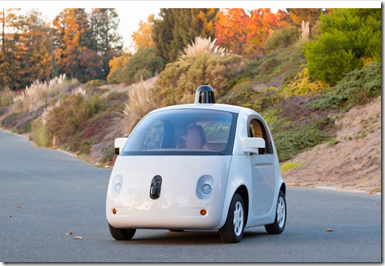
Maybe you missed it, but Google officially became a car company last week. The first prototypes of its adorable and potentially groundbreaking self-driving vehicle started rolling off the the assembly line.

Over the next few years, we're likely to see them tooling around California's roads as Google strives to make fully autonomous cars a reality.

For the most part, the traditional auto industry sees the Google self-driving project as a Very Interesting Idea.

And why not? If Google can develop a suite of software applications that will improve safety and enable people in cars to do things other that focus on driving 100% of the time, the process will yield technologies that can be installed in Buicks and Toyotas and BMWs.

Facts and Features of Google Car

And besides, automakers are pursuing their own self-driving tech. But Google has really upped the ante by building a whole new platform to integrate and advance its self-driving concepts. The Google Car looks like the product of a technology company. Its entire physical premise is, fundamentally, No Driver Required. This is utterly new: cars have always been build around the driver.

But Google has built its car around computer programming.

Bottom line: the traditional auto industry should be afraid - very afraid. Here's 3 Reasons Why The Auto Industry Should Be Terrified Of The Google Car:

1. The Google Car Is A Software Platform

The modern automobile is in many ways a rolling computer. But its legacy means that it's also a rolling engine and a large piece of industrial design that needs to protect 2-7 people and achieve speeds of over 100 mph, to be able to interact with other cars and the existing transportation infrastructure. As a result, cars can be updated in major ways only every 4-5 years. Consumer products and software, by contrast, can be updated yearly, monthly, weekly - and even daily! Google is constantly updating its applications, invisibly. So the Google Car will never be out of date, in terms of its brain.

2. The Google Car Doesn't Need To Go Fast

The Googlemobile isn't designed to operate at high speeds - its tops out at 25 mph - which allows for a simple design. One assumes that as the technology advances, the car will go faster, need to be bigger, and so on. But actually, the Google model of autonomous vehicles predicts a relatively low-speed world of mobility. The Moon Shot is the self-driving artificially intelligence to be able to deal with complex urban environments, where cars generally poke along at 25-50 mph. But there's no good reason for cars to be capable of highway speeds well in excess of speed limits. If self-driving cars could maintain steady highways speeds of around 60 mph and avoid traffic snarls, they might be able to improve travel times.

3. The Google Car Is Uncomplicated

It's a modest electric vehicle. Ultimately, it will have no controls for a driver. Electric motors are simple and require little maintenance. The Google Car won't need big brakes. It's designed for a world in which people don't own their cars, so what maintenance it does require can be carried out at central locations. If a component fails on the road, mechanics will probably be able to fix things quickly and easily. The cars we have now are extremely reliable compared to autos of the past, but a minor problem can still take one off the road for days.

A simple, slow software platform built by a Silicon Valley technology company. It should have the world's auto execs sweating with fear.
Read More

Friday, April 27, 2012

bench3

Google Drive Advantages and Disadvantages

Google Drive was offering 5GB of free online, synchronized storage, no strings attached, with competitive upgrade prices if you need more, from 25GB on up to 1TB.

Is it worth a look? Like most freebies from companies as ubiquitous as Google, I think so. After all, the only way to determine whether it’s right for your particular setup is to give it a spin.

Ok, I am writing this post to discuss the advantages and the disadvantages of Google Drive, Well, here it goes…

Reasonable Free Storage: The wonderful thing about Google Drive cloud storage for the moment is that it’s truly free, no hidden gotchas (well, yet anyway). Google Drive offers 5GB free storage, no privacy tradeoffs like crawling your data or bothersome inline ads to worry about.

Google Drive Advantages and Disadvantages

Integration with Google’s online products: Google naturally offers better integration with Google’s online products. However, never forger that, Dropbox’s simplicity of file sharing remains superior to Google Drive’s, offering better-integrated tools to quickly make files or folders accessible to other users (without requiring service memberships or logins), but if you and your friends, family or work collaborators already live in the Googlesphere, you owe it to yourself to give Google Drive a shake. Also you can sign in to DropBox with this link to give a try.

Google Drive Replaces Google Docs: Activate Google Drive and Google Docs is no more, at least as a standalone destination: Click on your old shortcut and you’ll be rerouted to drive.google.com, where your ‘Documents’ folder now exists as a subset of ‘My Drive’. Crafting a new spreadsheet or presentation now occurs by clicking a ‘Create’ button, and you can access shortcuts to your Google Docs directly from your Google Drive — launch one and you’re automatically routed to its Google Docs interface through your default browser. If Google Docs is your office suite mainstay, then Google Drive is a no-brainer.

One word search: Google even claims to be able to match unnamed photos with search terms, though it’s apparently limited to easily recognized objects. Upload documents, videos, PDFs, photos and more to your Google Drive and when you search on words like “Tuesday” or “urgent,” the service searches within each file for matches. What’s more, it uses optical character recognition (OCR) technology to make legible text in even scanned documents searchable (Google uses the example of an old newspaper article).

Reasonably quick: There’s no such thing as a “fast” cloud drive at this point, but Google Drive synchronizes offline files as fast as anything else, sometimes faster: In my tests, a 12MB image file took about two minutes to synchronize with Google Drive, where the same image took over three minutes using other such. But the difference is not much, however when uploading large file you will feel it.

Platform Agnostic: Google Drive works on Windows and Mac devices as well as Android ones out of the box, with a promised iOS client for iPhones and iPads in the offing (if you use one of the latter, you’ll have to wait a bit longer).

Google provides native apps for each device, making synchronization as simple as downloading the client, then dragging and dropping files to a mount point. The service’s only downside, if indeed this counts as one, is that it won’t sync existing folders outside the Google Drive share (on the other hand, the upside of having a single share point — though not unique to Google Drive — is that it encourages first-time users to organize their volatile data within a single location, making that data subsequently easier to find and maintain).

After saying all these advantages, you need to give more caution of the terms and conditions of Google on Google Drive..

Did anyone read the terms of service??? It says:

"When you upload or otherwise submit content to our Services, you give Google (and those we work with) a worldwide license to use, host, store, reproduce, modify, create derivative works (such as those resulting from translations, adaptations or other changes we make so that your content works better with our Services), communicate, publish, publicly perform, publicly display and distribute such content."

In other words you lose your intellectual property when you upload something there.

But, One of the executives at Google explicitly said the policy means people's files are still owned by them. They need that clause to provide the search and indexing service.

As in the same terms of service you can see:

"The rights you grant in this license are for the limited purpose of operating, promoting, and improving our Services, and to develop new ones."Nevertheless you are agreeing to "give up" your information to them.

Imagine you're writing a book and you store it there... they may use and modify your text to make advertising. Or use any private photo of you in any advertisement. They may even use a modified photo of you.

The use of private information to make advertisements is not cool to me and you don't get a dime if your information is used.

The final words……… I wont be using Google drive for storing my personal files, however, I like its service over all.

Read More

Thursday, April 26, 2012

bench3

Welcome To Google Drive

Google Drive is the home for all your files. With Google Drive for your PC, you can sync files from your computer to My Drive.

Then, go for a spin…

    Explore the left hand navigation.

Create Google Docs and more.

See files at a glance with the new grid view.

Get the Google Drive mobile app.

1. Click here and Save File in the window that appears. Don't see a window? Click here.

2. Select Downloads from the Tools menu in Firefox.

A window displaying your downloads will appear.

3. Click Open next to the product in the Downloads window.

Your software will now install automatically. If you need help, click here.

The installer should complete in seconds.

Read More

Tuesday, April 24, 2012

bench3

Google unveils new Google Drive cloud storage service

Google launched a long-anticipated "Drive" service that lets people store, share and collaborate on digital files in the Internet "cloud."

Google Drive accounts with five gigabytes of storage were available free at drive.google.com and upgrades to more space on servers in the California company's data centers were available at rates set by size and country.

The model is really designed at the core to help people live their lives in the cloud, Google Drive is something we see as central to the online experience at Google.

Google Drive software has been tailored for Windows and Macintosh computers as well as smartphones or tablets powered by Google-backed Android software.

Google unveils new Google Drive cloud storage service

Google Drive data can be reached from various devices, and deleting it from one deletes it from all. Scanned letters can be saved. Fax messages can be sent or received at Drive.

Watch the below video to understand Google Drive…

http://www.youtube.com/watch?feature=player_embedded&v=wKJ9KzGQq0w

http://www.youtube.com/watch?feature=player_embedded&v=1SjRH3SImlM

Read More
bench3

Get 5GB Storage On Google Docs For Free

Google is entering the cloud storage business and joining an ever increasing field with its gdrive service.

Google has been doing cloud storage for years! I use Google Docs every day. Google Music is where my entire music library is stored and all my photos are on Google+
Google's 2 step authentication pretty much beats anything any other cloud services have to offer.

Google Docs Grows to 5GB Free Storage, but this is how you will get that 5GB Free. This morning, Google Docs grew to 5GB free storage. It seems Google Drive shall be launching very soon.

If you only have 1GB of storage on Google Docs, upload a file (I just uploaded a simple txt file) and BAM! you instantly get upgraded to 5GB. Thank you Google! Gdrive precursor me thinks.

Get 5GB Storage On Google Docs For Free (2)

Who wants to play the betting game with me? Google Docs is going to be re-branded to Google Drive.

Anyway, I currently use dropbox because it is (in my eyes anyway) the safest storage option out there at the moment. With encryption tools it is as safe as it can be. And for me to move completely to Google Drive, needs some clarifications, Yes, some questions I would like to see addressed;

  • Is gdrive going to be as safe as others, such as dropbox ?
  • What security features are going to be in gdrive ?
  • Who will have access to the info stored on gdrive ?

However, I read something rather disturbing earlier online where it suggests that Facebook might be looking to acquire Dropbox to get in on the cloud business!

IF Dropbox becomes another Facebook acquisition I will delete my account! I wonder how many would follow suit?

Read More
bench3

Advantages Of Google Plus and Google Plus Circles

Google Plus is one of the social network by Google. Yes, it's another social network like Facebook, however, it has features that are unique to Google+ which makes it different. One of the distinct features that is at the heart of Google+ is Google Circles allowing users to create cliques or groups that enable sharing information only to people in those specific circles.

Google+ Circles have caused a bit of confusion in terms of how they work and how best to use them. Most users love this unique feature, whereas, some think it's not a big deal. On this web page, you will learn about Google+ Circles, how they work, how to create them, how to effectively manage your Google+ Circles and more.

Essentially, Google+ Circles are one of the unique features of Google Plus social network. They provide an effective way to organize friends and people in your social network into specific cliques or groups. By organizing your contacts into Google+ Circles, you can share your social updates and information with that distinct group of people rather than everyone in your social network.

Advantages Of Google Plus and Google Plus Circles

For example, if you have a Google+ Circle called Family and you want to share pictures of your birthday with only your family members, then Google+ Circles allow you to achieve just that rather than sharing the update with everyone in your social network.

Privacy Settings for Google+ Circles

Before you start sharing your updates and/or information on Google+ you should understand the privacy settings. In order to ensure that your updates are shared correctly to your Google+ Circles, you need to configure your privacy settings.

The privacy settings in Google+ allow you to decide whether you want to share your profile publicly or choose to keep it private. Also, you can control whether your Google+ profile shows up in search engines results by changing the settings.

You can change the privacy settings so other people in your Circles cannot see which Circles you belong to. As well as, change the settings to decide which people in your Google+ Circles appear on your Google Plus profile.

Pros and Cons of Google+ Circles

When sharing posts or updates on Google+ you can decide which Circles (or people in your Circles) are able to see them. Here are the key options available:

    •   Public: visible to anyone who can view your public profile;

    •   Your Circles: visible to everyone in your Circles;

    •   Extended Circles: visible to everyone in your Circles and their Circles;

Of course, if you've created your own Circles or use the default Circles already available like Family, Friends, Acquaintances, etc. when you choose these specific Circles, only people in those Circles will see your posts and updates.

Now that you understand the basics of how Circles work and how to share your content with people in your Google+ Circles, let's review some of the pros and cons of Google+ Circles so you can use this information to effectively manage your Circles.

Advantages of Google+ Circles: One of the biggest advantages of Google+ Circles is that you can create distinct groups of people in your social network so as to allow you to share specific updates or information with only those people rather than your entire social network.

This a great feature because if you want to share updates with your co-workers, but don't want to bother your family with those updates, you can set up a specific Google+ Circle for your co-workers.

Another benefit of Google+ Circles is that if you want to look at updates from your family members in your social network, you can choose that particular Google+ Circle which will display updates from your family members rather than having to sift through a whole bunch of updates from your entire network.

Google+ Circles allow people, you don't know, to follow you, but you don't need to add them to your Circles. People who follow you will only see updates and information that you have shared publicly. This is similar to Twitter, but unlike Facebook.

Creating Circles is easy, as well as, moving people from one Circle to another by using the drag and drop functionality . Also, you can have the same person in multiple Circles, if you choose to.

Potential Drawbacks of Google+ Circles:

Though Google+ Circles have some great advantages, there are some aspects that you need to be aware of, in terms of privacy, before starting to use your Google Plus social network.

When you share a post or update, Google+ automatically defaults the last Circle(s) it was shared with, therefore, you need to check this before publishing a new update to your Circles. If not, you may end up sending an update to a Circle you didn't intend to.

How To Disable Re-sharing:

If you share updates to a specific Circle, anyone in that Circle can re-share your update with other people in their Circles, Extended Circles (friends of friends) or even publicly. However, if you'd like to disable re-sharing of your post, you can do so by using the drop-down arrow on the top-right of the particular post.

Currently, Google+ allows a maximum of 5,000 people in all Circles, but this may change given that Google+ is evolving almost every day with enhancements.

Read More